
Invented by PUNDAK; Gilad, GRINBERG; Hanan, ARBEL; Eran, Microsoft Technology Licensing, LLC

Touchscreens are everywhere – on our phones, tablets, laptops, and even some fridges. But have you ever tapped your device and nothing happened? Or maybe you accidentally touched the screen and something you didn’t expect happened anyway? This is a common frustration for many people. A new patent application aims to make touchscreens much smarter by teaching devices to tell the difference between touches you meant to make, and those you didn’t.
Background and Market Context
Touchscreens are now a big part of how we use technology. From small smartphones to big tablets and even in cars, people rely on touch to control their devices. This way of using a device feels natural and direct. But it is not perfect. Sometimes, your hand brushes the screen by accident, or your palm rests on it while you’re writing or drawing. The device might think you meant to touch it, and then something unwanted happens. Other times, you tap the screen on purpose, but the device ignores you.
This problem is bigger than most people realize. If a device is too quick to accept every touch, it can make mistakes. It might delete files, send messages, or do things the user never meant to happen. But if it is too careful and ignores too many touches, people get frustrated because their actions are ignored. This balancing act—between missing real touches and stopping accidental ones—has been a challenge for device makers for years.
Manufacturers have tried different ways to fix this. Some use simple rules: if a touch is big, maybe it’s a palm, not a finger. Others use more sensors: a stylus might tell the device when it’s in use, or the device might sense movement to guess if you’re walking. But these solutions are not very smart. They often rely on old methods that don’t use all the information the device can collect. And updating them can be hard, because the basic software is deep inside the device (called “firmware”), which is not easy to change.
Now, as devices get more complex—with foldable screens, detachable keyboards, and more sensors (like cameras and motion sensors)—the need for better touch recognition has grown. People expect their devices to understand them better, and they want fewer mistakes. If a device can tell the difference between a true tap and a mistake, it can make the user’s life easier and prevent lots of frustration.
This patent application is important because it introduces a smarter, more flexible way for devices to decide which touches are real and which are not. It uses more information, better models, and allows for easy updates as new situations or sensors are added. This could help all kinds of devices—from tablets for artists to foldable laptops—work better and feel more “human” in how they respond to touch.

Scientific Rationale and Prior Art
To really understand this invention, it’s helpful to see what came before it and why that wasn’t good enough. Traditional touchscreens mostly rely on “capacitive” sensors. These sensors notice when something, like your finger, changes the electrical charge on the glass. The device then guesses, based on the size and shape of what it feels, whether it’s a finger, a palm, or maybe a stylus. This is called “blob detection”—the device looks at blobs of touch and tries to figure out what they are.
Some devices add extra information. For example, if you use a stylus, the device might talk to it and get more details—like how hard you press, or if you press a button on the stylus. Some tablets and computers also use simple motion sensors, like accelerometers, to tell if you’re moving or if the device is lying flat. With these extra bits of information, the device tries to make a smarter decision about every touch.
But these older methods have limits. First, they often only use one kind of information at a time. If the touch sensor is confused, it might ignore useful data from the camera or the motion sensor. Second, most of the logic is deep in the firmware. That means if you want to make changes—to add a new way to detect touches, or fix a bug—it’s a big job. You might have to update the whole device, which is slow and risky.
Other attempts to improve touch detection have included “palm rejection” for stylus use. Here, the device tries to ignore big blobs that look like a palm when you’re drawing or writing. Some systems use machine learning, training a model with lots of examples of good and bad touches. But again, these models often only look at one kind of data: either the touch sensor, or maybe the motion sensor, but not both together.
The scientific problem is that touch is not always clear. Sometimes, a touch can look accidental (like a big blob on the edge) but is really intended. Other times, a small blob might be a real finger, or just a brush of your shirt. Devices need more context—what is the user doing, are they holding the device, are they using a stylus, are they walking, and so on.
This patent’s scientific insight is to use a two-stage approach, combining different types of data, and to make it easy to add or update new ways of understanding touch. In the first stage, the device uses what it already knows (like the touch sensor’s data) to check if a touch is very likely to be accidental. If so, it can ignore it right away. If not, it moves to a second stage, where it brings in extra sensors—like the camera, motion sensors, or posture sensors—to make a better decision. This makes the system both quick (for obvious mistakes) and smart (for tricky situations).

By separating these stages, the device can be updated more easily. For example, if a new sensor is added, or a better model is trained, only the second stage needs to change. The basic touch logic stays the same. This is a big improvement over older systems, and it sets the stage for smarter, more human-like touch detection in all kinds of devices.
Invention Description and Key Innovations
Let’s go step by step through what this patent covers and why it’s different from what came before. The goal is to help devices tell, with high confidence, whether a touch was on purpose or a mistake, using all the data the device can gather.
First, the device recognizes a touch. This can come from a finger, a hand, a stylus, or anything else that can change the sensor. The device then looks at “features” of the touch—how big it is, where it is, how it moves, and so on. It uses a model (which can be trained using machine learning) to figure out the “first likelihood” that this touch is unintentional. This is like the device saying, “Based on what I see from the touch sensor, how sure am I that this was a mistake?”
If this likelihood is greater than a certain threshold (meaning, the device is pretty sure it’s a mistake), the device can just ignore the touch. This is quick and saves time. But if the likelihood is lower—maybe the touch is tricky, or the device isn’t quite sure—it moves to a second step.
In this second step, the device looks at more data. This can include:
- Camera images (even at low resolution and speed, to save power).
- Motion sensors (like accelerometers or gyroscopes) to see if the device is moving, being held, or lying flat.
- Device posture sensors, which can tell if the device is folded, propped up, or connected to another part (like a keyboard).
- Information from the stylus, if used, such as pressure or grip.
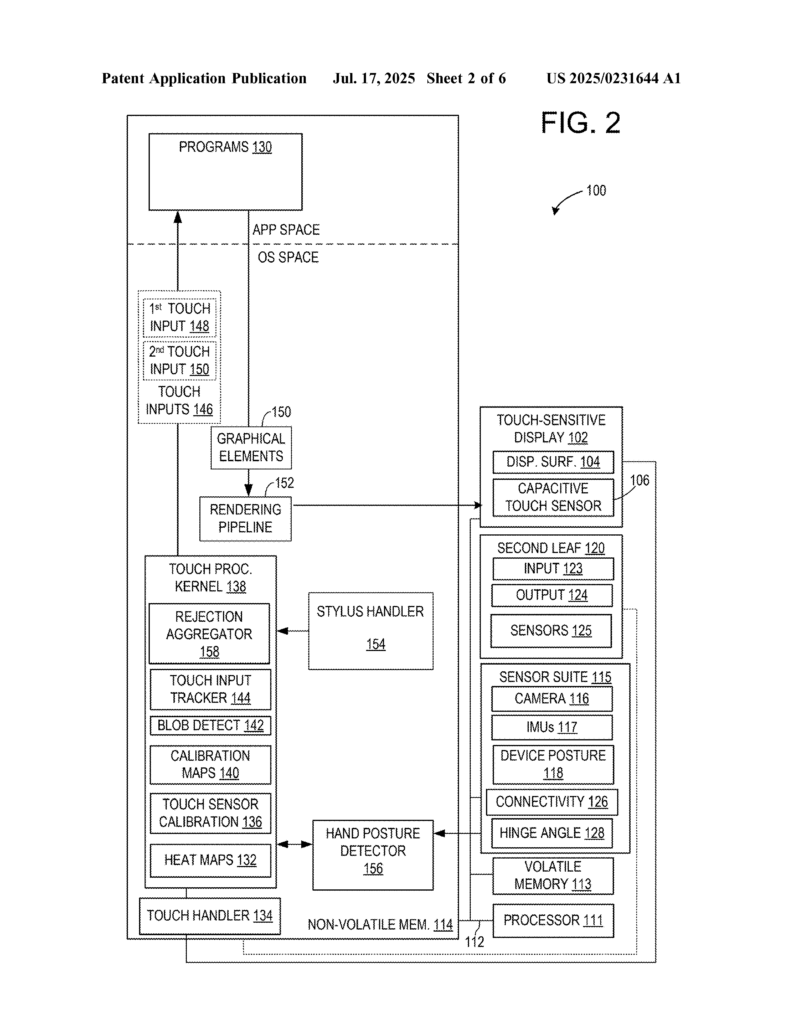
The device extracts “features” from these sensors, such as:
- Is the user’s hand visible? What posture are they in?
- Is the device being held, or sitting on a table?
- Is the user walking, sitting, or moving the device around?
- Is the stylus being held, and how?
A second model, also trained with lots of examples, uses these features to figure out the “second likelihood” that the touch was unintentional. Now, the device has two pieces of evidence: what the touch sensor says, and what all the other sensors say.
Next, the device combines this information. It calculates an “aggregate likelihood”—a final score based on both the touch sensor and the extra sensors. If this score is above a second threshold (meaning, it’s now pretty sure the touch was a mistake), the device ignores the touch. If not, it sends the touch on to whatever app or program is running, so your drawing, writing, or swipe can happen as you expect.
This system is set up in a way that lets each part be updated or improved without needing to change everything else. For example, if a better hand posture detector is invented, it can be plugged into the second stage. Or, if a new kind of sensor is added to a future device, it can be included in the second stage’s analysis. The first stage, which is fast and basic, doesn’t have to change.
Some special features of this invention include:
- It works for both finger and stylus input, and can tell the difference between them.
- It uses cameras in a low-power “always-on” mode, so it doesn’t waste battery but can still spot important clues (like where your hand is).
- It can learn and adapt to each user, storing profiles so that people with big hands or left-handed users are treated fairly.
- It can use information from connected devices (like a watch or phone) to get even more context about what you’re doing.
- It is modular, meaning each sensor or model can be improved without needing to change the whole system.
- The decision-making uses the best available data, combining quick judgments with deeper analysis only when needed.
- It can work with many kinds of devices, from single-screen tablets to complex foldable laptops or two-in-one devices.
The technical result is a device that feels much more responsive and accurate. It ignores accidental touches without ignoring real ones. It can tell when you mean to tap, draw, or write, even in tricky situations—like when your palm is resting on the screen, or when you’re walking and gripping your tablet. It’s also more energy-efficient, because it only uses deep analysis when needed, and it can update parts of itself as technology improves.
This invention is a big step forward for making devices that “feel” smarter and more natural to use. It means fewer mistakes, less frustration, and a better experience for everyone, whether you’re a kid drawing on a tablet, a student taking notes, or a professional using a foldable laptop.
Conclusion
This new patent application offers a practical and smart solution to a problem that frustrates millions of people every day. By using a two-stage approach—quickly handling obvious accidental touches, and then using extra sensors and smarter models for the tricky ones—devices become much better at understanding what you really want to do. The invention stands out because it is flexible, easy to update, and designed to work with a wide range of sensors and device types. It lets each part of the system improve over time, without needing to overhaul the whole device.
The result is a future where touchscreens make fewer mistakes, ignore more accidents, and always respond when you really mean it. That makes our devices friendlier, more reliable, and much more enjoyable to use.
Click here https://ppubs.uspto.gov/pubwebapp/ and search 20250231644.